There is exactly one correct answer for your rig, and it is not a preference setting. Here is the geometry, the number for every common screen size, and what each level of field of view costs to buy.
Almost every sim ships with a default field of view that is wrong for you. Not slightly wrong. Wrong by 30 or 40 degrees, because the default was picked for someone sitting several feet from a television and you're sitting two feet from a monitor.
That's the most common invisible problem in sim racing. Your braking points never settle. Corners arrive sooner than they should. You're quick one lap and half a second off the next, and you blame the pedals. Usually the pedals are fine and the geometry is broken.
This guide is the fix. What FOV is, what goes wrong when it's off, the exact number for every common screen at every common seating distance, how to enter it in each sim, and then the part nobody writes about honestly: what a genuinely wide correct field of view costs. If you haven't picked a display yet, read this next to our guide to the best screens to use for sim racing, because the two decisions are really one decision.
FOV Is a Property of Your Rig, Not Your Game
Field of view is the angle of the virtual world your screen shows you. Think of the monitor as a window. Hold a window frame close to your face and you see a wide slice of the world through it. Push it away and the slice narrows. The window didn't change. The angle did.
That gives you the whole formula:
FOV = 2 × arctan( (screen width ÷ 2) ÷ eye-to-screen distance )Two inputs. Screen width and distance. That's the entire calculation, and it means your correct FOV is a physical fact about your cockpit rather than a number you can have an opinion about. Two people with identical 32-inch monitors have different correct FOVs if one sits 60cm back and the other sits 80cm back.
There's a second reason people get this wrong: no two sims ask for the same number. Some want the horizontal angle, some want the vertical angle, and a few want something stranger than either. There's a conversion table further down, but it means a value that is perfect in iRacing will be badly wrong if you type it into Assetto Corsa Competizione.
What Actually Goes Wrong When FOV Is Wrong
Most FOV guides wave their hands here and say it feels off. The research is more specific than that, and it's worth knowing which direction your error runs.
Too wide: the default, and the popular mistake
A FOV wider than your geometry dictates zooms the world out. Everything renders smaller and therefore looks further away than it is. Speed feels exaggerated, which is exactly why it's seductive and why so many people widen their FOV on purpose. The cost is that you brake late, because the corner your eyes report as distant is already on top of you, and your apex references never settle from lap to lap.
Too narrow: the opposite failure
A FOV narrower than geometry zooms the world in. Objects loom larger, and the peripheral content that carries most of your speed information gets cropped out of the frame. Your brain reads the reduced optic flow as slower than you're actually going.
That effect has been measured. In a study run on a three-screen simulator covering 135 degrees of physical field of view, 41 licensed drivers drove with the geometry set correctly at 135 degrees, and again zoomed in to 60. With the speedometer hidden, they were asked to hit target speeds of 50, 70, 80 and 100 kph.
At the zoomed-in setting, drivers badly underestimated how fast they were going and overshot every target speed. The paper's recommendation is a scale factor of 1.00 between rendered and physical field of view, which is the academic way of saying use the correct FOV. It also tracked where drivers placed the car in the lane, and the zoomed-in view changed that too.
Vision research points the same direction. Work by Pretto and colleagues, cited in later research on perceived vehicle speed, found that when peripheral vision was blocked, people underestimated visual speed, and the underestimation got worse as the field of view shrank from 60 degrees down to 10. Your peripheral vision is doing real work on every lap, and a narrow FOV takes it away.
The Correct FOV for Your Screen, Calculated
Below is the geometry worked out for the panels people actually buy. Find your screen, find your seating distance, use the number. hFOV is the horizontal angle, vFOV is the vertical, and the next section tells you which one your sim wants.
Measure from your eyes to the center of the screen while you're sitting in your driving position, with a tape measure. Not your arm, not an estimate. This is the input that moves the answer most.
| Screen | 50 cm | 60 cm | 70 cm | 80 cm | 90 cm |
|---|---|---|---|---|---|
| 27" 16:9 | 62 / 37 | 53 / 31 | 46 / 27 | 41 / 24 | 37 / 21 |
| 32" 16:9 | 71 / 44 | 61 / 37 | 54 / 32 | 48 / 28 | 43 / 25 |
| 34" 21:9 | 77 / 37 | 67 / 31 | 59 / 27 | 53 / 24 | 48 / 21 |
| 43" 16:9 | 87 / 56 | 77 / 48 | 68 / 42 | 62 / 37 | 56 / 33 |
| 45" 21:9 | 93 / 48 | 83 / 40 | 74 / 35 | 67 / 31 | 61 / 28 |
| 49" 32:9 | 100 / 37 | 90 / 31 | 81 / 27 | 74 / 24 | 67 / 21 |
| 52" 21:9 | 101 / 54 | 91 / 46 | 82 / 40 | 75 / 36 | 68 / 32 |
| 55" 16:9 | 101 / 69 | 91 / 59 | 82 / 52 | 75 / 46 | 68 / 42 |
| 65" 16:9 | 110 / 78 | 100 / 68 | 92 / 60 | 84 / 54 | 77 / 48 |
Values are horizontal / vertical degrees, rounded. Calculated from flat-panel geometry using the physical width of each aspect ratio. A curved panel adds roughly two to four degrees over these figures, since the edges wrap toward you.
A few things jump out of that table once you sit with it.
A 27-inch monitor at a normal desk distance gives you somewhere in the forties. That's a keyhole. It is geometrically correct and it is still a keyhole, which is the distinction most FOV arguments fail to make.
The 49-inch super ultrawide is the most interesting row. It delivers 90 degrees horizontally at 60cm, more than any single 16:9 panel short of a 65-inch television, but only 31 degrees vertically. That 32:9 shape is a letterbox by design, and in formula cars, where the halo and mirrors sit high in the frame, you feel the missing height. It's the reason we often point people toward a 45-inch 21:9 panel instead, which trades a little width for considerably more vertical.
And notice how little the 55-inch television gains you once you account for the distance it forces. You can't sit 50cm from a four-foot-wide screen, so in practice a single 55 lands around 75 degrees, which a 45-inch ultrawide matches from much closer.
We calculate this for every rig we deliver, then set it in each sim the customer plays before the simulator leaves the shop. No spreadsheet homework on your end.
Get My Custom Build Plan →Triple Screens: The Total, and the Angle Nobody Sets
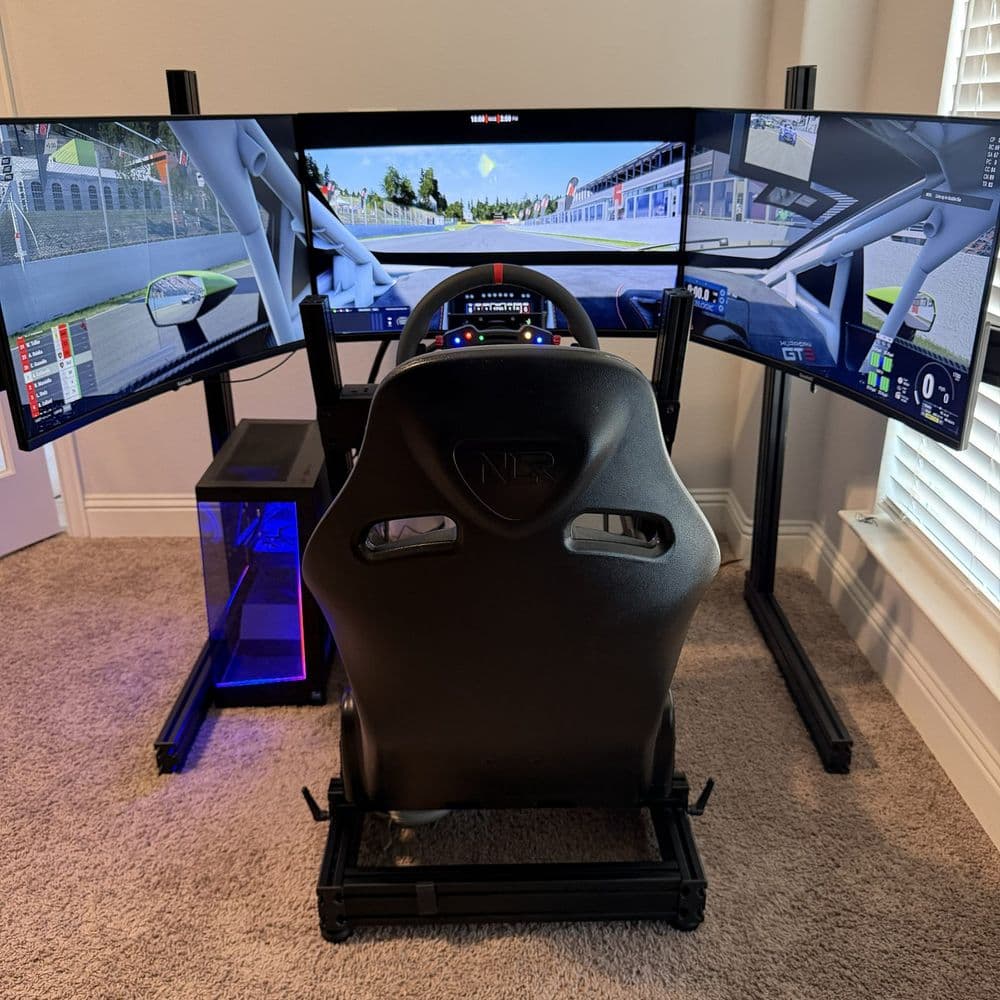
Triples change the math in two ways. The total field of view is the sum of all three panels, and the side panels have to be angled so that each one sits square to your line of sight. Get the second part wrong and the first part doesn't matter, because the image won't line up across the seams.
The geometrically correct toe-in angle for each side screen equals the single-screen FOV. If one panel covers 57 degrees, each wing rotates 57 degrees inward. That is considerably more aggressive than most people set by eye, and it's the single most common installation error we find on rigs customers built themselves.
When the angle is right, every pixel on all three screens sits the same distance from your eyes, and the image flows across the bezels as one continuous world. When it's wrong, objects stretch or jump as they cross a seam, which your brain registers as wrongness even when you can't name it.
| Triple Setup | Distance | Per Screen | Total hFOV | Toe-in Each Side |
|---|---|---|---|---|
| Triple 27" 16:9 | 60 cm | 53° | 159° | 53° |
| Triple 27" 16:9 | 70 cm | 46° | 139° | 46° |
| Triple 32" 16:9 | 65 cm | 57° | 172° | 57° |
| Triple 32" 16:9 | 75 cm | 51° | 152° | 51° |
| Triple 43" 16:9 | 80 cm | 62° | 185° | 62° |
| Triple 45" 21:9 | 75 cm | 70° | 211° | 70° |
| Triple 45" 21:9 | 85 cm | 64° | 191° | 64° |
| Triple 52" 21:9 | 85 cm | 71° | 214° | 71° |
| Triple 55" 16:9 | 90 cm | 68° | 205° | 68° |
Most sims ask for the single-screen value and handle the rest through their triple-screen configuration. Enter the per-screen number, not the total.
Two practical notes. First, enter your bezel width in the sim's triple configuration. The game needs to know how much world is hidden behind the plastic, or the image comes out subtly compressed. Second, a correctly angled array wraps tighter than a flat row of monitors, so it takes less width than you might expect and more depth. Plan the room using the envelope figures in our screens guide, which include the mount hardware and walking room.
Side-screen angles are the thing customers most often ask us to fix on rigs they already own. On our builds the mount is cut to the calculated geometry, so the angles are right before the screens go on.
Quote a Triple-Screen Build →Which Number Goes in Which Sim
This is where a correct calculation still ends up entered wrong. The angle is the same physical fact in every title, but each engine asks for it differently.
| Sim | What It Wants | Where to Find It |
|---|---|---|
| iRacing | Horizontal FOV | Options > Graphics, or the in-car camera tool |
| Assetto Corsa | Vertical FOV | Settings > View > Field of View |
| Assetto Corsa Competizione | Vertical FOV | Settings > Graphics > FOV |
| Automobilista 2 | Horizontal FOV | In-car camera settings |
| rFactor 2 | Vertical FOV | Ctrl+F while driving, or the player JSON |
| Le Mans Ultimate | Vertical FOV | Same system as rFactor 2 |
| RaceRoom | Vertical FOV | In-car camera options |
| F1 24 and F1 25 | Doubled vertical FOV | Camera Settings > Field of View |
| EA Sports WRC, DiRT Rally | Doubled vertical FOV | Cockpit camera settings |
| BeamNG.drive | Vertical, despite the label | Camera settings |
| Richard Burns Rally | Radians, not degrees | Graphics configuration files |
| VR, any title | Nothing. Leave it alone | The headset sets it |
Game-specific handling per the SimRacingCockpit FOV calculator, which also converts these for you automatically.
One sequencing rule matters more than any of this: set your seating position first, then your FOV. Eye height, wheel reach, pedal distance, mirrors visible. Once the ergonomics are locked, measure and calculate. If you move the seat next month, the number changes and you recalculate.
So What Is the Best FOV?
Two-part answer, and the second part is the one that costs money.
Part one: correct is the only right answer, whatever your hardware. Running a deliberately wrong FOV to make up for a small screen doesn't give you more information, it gives you distorted information. Every degree you add beyond geometry is a degree of lie about where the apex is.
Part two: not all correct FOVs are equal, and this is what people miss. Fifty degrees of correct FOV and 160 degrees of correct FOV are both geometrically honest, and they are not equally useful. The simulator research above found accurate speed perception at 135 degrees and clear distortion at 60. That gives you an actual target rather than a vibe.
Correct horizontal FOV by setup, calculated from panel geometry. Grey bars are reference points. The 135-degree benchmark is the setting at which drivers in the simulator study judged their speed accurately.
Read that chart as a ladder rather than a pass or fail. Under about 60 degrees you're geometrically honest but working with genuinely restricted information, leaning on radar overlays to know where cars are. Between 60 and 110 you have a usable driving view and still no real peripheral awareness. Past about 135 you cross into the territory where the research says drivers behave the way they do in a real car. Past roughly 180, the outer screens sit in true peripheral vision where you detect motion rather than read detail, which is valuable for exactly the speed-sensing reason above, but the returns have started to taper.
So the best FOV is the correct FOV for the widest display you can justify. Which brings us to price.
What Each Level of Field of View Costs
Since correct FOV is bought rather than configured, it's worth looking at what a degree actually costs. The table below uses realistic seating distances for each setup and current screen pricing, with the full reasoning behind each display option in our screens guide.
| Setup | Distance | Correct hFOV | Screen Cost | Per Degree |
|---|---|---|---|---|
| Single 27" 1440p | 65 cm | 49° | $250 | $5.06 |
| Single 32" 1440p | 65 cm | 57° | $300 | $5.25 |
| Meta Quest 3 (VR) | n/a | 110° | $599 | $5.45 |
| Triple 27" 1440p | 65 cm | 148° | $750 | $5.06 |
| Triple 32" 1440p | 70 cm | 161° | $1,000 | $6.21 |
| Pimax Crystal Light (VR) | n/a | 115° | $899 | $7.82 |
| Triple 43" 4K | 85 cm | 175° | $1,500 | $8.55 |
| Single 49" Odyssey G9 | 65 cm | 85° | $850 | $9.96 |
| Pimax Crystal Super UW (VR) | n/a | 140° | $1,599 | $11.42 |
| Single 45" LG OLED | 70 cm | 74° | $1,200 | $16.22 |
| Triple 45" LG OLED | 80 cm | 200° | $3,600 | $18.00 |
| Triple 55" OLED TV | 95 cm | 196° | $4,200 | $21.44 |
| Triple 52" 5K2K | 90 cm | 204° | $6,000 | $29.36 |
Screen cost only. Mounts, cabling, and the graphics card to drive the resolution are separate, and on triples they are not small.
The pattern is clear enough that it settles most arguments. Triple 27 and triple 32 setups deliver correct field of view more cheaply per degree than anything else on the market, including a single entry monitor. You're buying 150 to 160 degrees for around a thousand dollars in panels, which is why that configuration is still the value benchmark in sim racing and why it's what we recommend most often on builds in the $9,000 to $12,000 range.
VR is the other efficient answer. A Quest 3 gets you 110 degrees for $599 with no room requirement at all, which no monitor arrangement can touch. The trade is everything covered in the screens guide: the frame-rate cost, comfort over long stints, and not being able to see your own hardware.
At the top, you're no longer buying field of view. Triple 45-inch OLEDs cost roughly three and a half times what triple 32s cost and give you about 25% more angle. What the money actually buys is OLED contrast, 240Hz response, and the resolution to read a braking board at distance. Those are real, and they're worth it to plenty of our customers, but they are not FOV. If field of view is the specific problem you're solving, the cheap answer is the good answer.
Not sure which rung of that ladder your space and budget land on? Send us your room dimensions and what you race, and we will come back with the display, the mount geometry, and the FOV numbers already worked out.
Quote My Simulator →Distance Is Free Field of View
Before you buy anything, check what you already have. Distance is one of only two variables, so moving the screen toward you is a genuine upgrade that costs nothing.
A 32-inch monitor at 90cm gives 43 degrees. The same monitor at 60cm gives 61. That's an 18-degree gain, roughly the difference between a 27-inch and a 43-inch panel, available for the price of an afternoon with an Allen key. A 45-inch ultrawide moved from 90cm to 65cm goes from 61 degrees to 78.
Most self-built rigs have the screen too far away, usually because the monitor is on a desk behind the cockpit instead of mounted to it. Mounting the display to the rig itself is the fix, and it solves a second problem at the same time: a screen attached to the chassis moves with you on a motion platform and doesn't shake independently when a direct drive wheelbase kicks.
There is a limit. Somewhere around 50cm you start seeing pixel structure and losing the ability to take in the whole frame without moving your eyes. Between 50 and 70cm from the center screen is the working window for most people and most panel sizes.
When Deviating From Correct Is Defensible
I'd rather give you the complication than pretend it doesn't exist.
The literature on absolute speed perception isn't unanimous that 1:1 is perfect. Diels and Parkes found that even at a geometrically correct ratio, drivers still underestimated visual speed, overproducing target speeds by about 10% on average, and a regression put the optimum ratio at 1.22:1. The likely reason is that a simulator gives you no G-forces, so vision is carrying a load it doesn't have to carry in a real car, and a slightly stretched image compensates for part of it.
Take that for what it is. It was about producing a target speed on a road, not about hitting the same braking point sixty laps in a row. Absolute speed estimation and lap-time repeatability are different tasks, and correct FOV wins clearly on the second one. It is not a license to run 100 degrees on a 27-inch monitor.
Two deviations we do think are reasonable:
- A few degrees wide on a single small screen to keep mirrors usable. If correct geometry puts your virtual mirrors off the edge of the frame, adding three to five degrees is a fair trade for being able to race in traffic. Add the smallest amount that solves the problem.
- Whatever your muscle memory is built on, if you're mid-season. Changing FOV resets every braking reference you own. Make the change during a quiet week, not the night before a championship round.
What we wouldn't do is widen FOV because correct feels claustrophobic at first. It will. If you've spent months on a default 90-degree setting, the correct value feels like a letterbox for about three or four sessions while your spatial calibration resets. That adjustment period is the normal experience, not a sign the number is wrong.
How We Set This Up on a Customer Build
The order of operations matters, and it's the same on every rig we deliver.
- Seat and pedals first. Driving position is set to the driver, with the seat, pedal plate, and wheel deck positioned for their height and reach. Nothing about the display gets touched yet.
- Screen mounted to the chassis, as close as the wheel allows. On an integrated mount, not a separate stand, so the geometry holds under load and on motion.
- Measure and calculate. Tape measure from eye point to screen center, then the correct horizontal and vertical values get computed for that driver in that seat.
- Side-screen angles set to the calculated toe-in, on triples, with bezel widths measured and entered.
- Configured per title. Each sim the customer plays gets the right conversion, entered and verified on track rather than assumed from a spreadsheet.
- Checked against a known reference. The quickest sanity check in any sim is the virtual steering wheel: at correct FOV it should be about the size of the real wheel in your hands. If the on-screen wheel looks dramatically smaller than the one you're holding, the FOV is too wide.
That last check is worth doing yourself tonight, whatever rig you're on. It takes ten seconds and tells you most of what you need to know.
Frequently Asked Questions
What FOV should I use for sim racing?
Whatever the geometry of your rig produces. For reference, a 27-inch monitor at 60cm is 53 degrees horizontal, a 32-inch at 60cm is 61, a 49-inch ultrawide at 60cm is 90, and triple 32-inch panels at 70cm total about 161. There is no universal number because there is no universal rig.
Does correct FOV actually make you faster?
It makes you more consistent, which usually shows up as faster. You are not gaining grip, you have just stopped getting misleading information about where things are. The clearest measured effect is on speed judgment: in controlled testing, drivers on a zoomed-in view badly underestimated how fast they were going and overshot every speed they were asked to hit.
Why does the correct FOV feel so narrow?
Because game defaults are much wider than geometry, usually 80 to 100 degrees, and your brain has calibrated to that. Give it three or four sessions. The feeling of restriction fades and your braking consistency turns up.
Do I need a different FOV for each game?
The physical angle is the same. The number you type in is different, because some sims want horizontal, some want vertical, and a few want doubled or converted values. Use the conversion table above.
What about curved monitors?
A curve wraps the edges toward you, so the effective angle is slightly wider than flat geometry predicts, usually by two to four degrees. Any decent calculator has a curve radius input. It is a refinement, not a different calculation.
How do I set FOV in VR?
You do not. The headset lenses and panels fix it, and the sim reads that figure from the runtime. Leave the in-game FOV alone. If a title has a VR world-scale slider, match it to the headset rather than dialing in a monitor-style number.
Is it worth buying a bigger screen just for FOV?
Only after you have moved the screen you own as close as it will go. Distance is free, and on most self-built rigs there are 15 or more degrees sitting unclaimed behind a badly positioned monitor. After that, triple 27 or 32-inch panels are the cheapest real field of view available.
We build turnkey simulators and install them across DFW, calibrated to the driver rather than handed over as a box of parts. Tell us your space and your budget and we will send a full spec with the geometry already solved.
Request a Custom Simulator Quote →FOV figures were calculated from flat-panel geometry using the formula above and cross-checked against published sim racing FOV calculators. Screen pricing reflects US listings as of September 2026 and changes frequently. Research citations are linked inline.